Bir sistemde nerelerde Repair yapılmıs ,hangi SAPNote'lar uygulanmış, hangi Bapiler kullanılmış kısaca sistemde yapılan tüm değişikliklerin listesi..
se95
7 Aralık 2008 Pazar

3 Aralık 2008 Çarşamba
FI Müşteri bakiyesi
Önceki ve Mevcut dönemin müşteri bakiyesini kısa yoldan bulmak için (bsid ve bsad dan okumak yerine) KNC1 ve KNC3 tablolarindan direkt okuyabilirsiniz.
23 Kasım 2008 Pazar
FI Bapi'leri
BAPI_ACC_DOCUMENT_POST --> FI belgesi yaratir
BAPI_SALESORDER_CREATEFROMDATA --> Sipariş
BAPI_BILLINGDOC_CREATEMULTIPLE --> Fatura
Test programi --> ACC_BAPI_TEST_DOCUMENT
eger KDV satiri yaratacaksan
it_accounttax LIKE TABLE OF bapiactx09 WITH HEADER LINE
kullanman gerekiyor..ama İş alanı zorunlu olmamasi lazım ona da
FS00 dan AnaHesap Düzenleme merkezinden KDV hesabina bakabilirsin..39 ile baslayan.
Giriş banka faizin altında alan durum grubu B000 i seçebilirsin..Normalde diger hesaplarda G001 İş alani seçilmis oluyor.
BAPI_SALESORDER_CREATEFROMDATA --> Sipariş
BAPI_BILLINGDOC_CREATEMULTIPLE --> Fatura
Test programi --> ACC_BAPI_TEST_DOCUMENT
eger KDV satiri yaratacaksan
it_accounttax LIKE TABLE OF bapiactx09 WITH HEADER LINE
kullanman gerekiyor..ama İş alanı zorunlu olmamasi lazım ona da
FS00 dan AnaHesap Düzenleme merkezinden KDV hesabina bakabilirsin..39 ile baslayan.
Giriş banka faizin altında alan durum grubu B000 i seçebilirsin..Normalde diger hesaplarda G001 İş alani seçilmis oluyor.
16 Kasım 2008 Pazar
Data Types and Data Objects

In SAP Web As 6.10 and later, you can also specify the length after the LENGTH additon.Eg.
TYPE
DATA
Literals are data objects that are defined in the source text of a program and whose values are uniquely defined.the Abap runtime environment differentiates between three types of literals.
a)numeric literals
b)Text field literals
c)string literals
To display a single quote within a text field literal, you have to enter it twice
The TABLES statement always creates data objects that are visible program-wide.Data Objects that are created with the TABLES statement are always visible in the entire program,even if the statement appears within a subroutine or function module.
Data objects in modules and event blocks are always global.
In contrast to many other programming languages,the result of integer arithmetic in ABAP is rounded up or down to the nearest integer.
Data int type i.
int = 4 / 10. "Result 0
int = 5 / 10. "Result 1
Moreover- again in contrast to many other programming languages all interim results are also rounded.

int = 10 * ( 4 / 10 ). "Result 0
int = ( 10 * 4 ) / 10. "Result 1
Floating point arithmetic
Data: float type f,
pack type p decimals 2.
float = 73050 * '0.0727'. "Result 5.3107349999999997E+03
pack = float.
write pack. "Result 5310.73
Packed Number

Mixed Arithmetic Expressions


Caution: When trigonometry functions and other scientific functions,
logarithms and exponential functions (including the ** operator) are used,
floating point arithmetic is always used for calculation.


Search Help
There are two types of search help:
1)Elementary search helps describe a search path.
2)Collective search helps combine several elementary search helps. A collective search help thus can offer several alternative search paths.
Maintance views may not be used as the selection method for search helps.Normally a database view is used.However, you should note that database views(in R/3 system) are always created with an inner join.Sometimes values should be determined with outer join.In this case you should choose a help view as selection method.
A search help exit is a fnction module having a standardized interface.The function module F4IF_SHLP_EXIT_EXAMPLE can be used as template.
1)Elementary search helps describe a search path.
2)Collective search helps combine several elementary search helps. A collective search help thus can offer several alternative search paths.
Maintance views may not be used as the selection method for search helps.Normally a database view is used.However, you should note that database views(in R/3 system) are always created with an inner join.Sometimes values should be determined with outer join.In this case you should choose a help view as selection method.
A search help exit is a fnction module having a standardized interface.The function module F4IF_SHLP_EXIT_EXAMPLE can be used as template.
14 Kasım 2008 Cuma
9 Kasım 2008 Pazar
Buffering

"rdisp/bufreftime" defines the length of the interval in seconds.
1)Full buffering
When a record of the table is accessed, all the records of the table are loaded into the buffer.
2)Generic buffering
The generic key is a left-justified part of the primary key of the table that must be defined when the buffering type is selected.Client-dependent, fully buffered tables are automatically generically buffered.
3)Single-record buffering
All the accesses to the table that do not use SELECT SINGLE bypass the buffer and directly access the database.If the table does not contain a record with specified key, this record is recorded in the buffer as non-exist.
8 Kasım 2008 Cumartesi
Cluster & Pool tables

Should be accessed via primary key-very fast retrival otherwise very slow

No secondary indexes
No aggreagate functions (sum,avg,min,max)
pool and cluster table is many to one
cannot be read outside SAP
Cluster Tables : BSEC BSED BSEG

The basic idea of a table pool, as opposed to table clusters, is storage of data records from the tables defined in the ABAP Dictionary that are not dependent on one another.You would like combine small R/3 tables to a database table.

Pool tables are defined to host lots of small tables.
Pool tables --> A001 A002 A003

Table Logging
Parameter "rec/client" can have the following settings
rec/client=ALL all the clients should be logged
rec/client=030 only the specified clients should be logged
rec/client=OFF logging is deactivated int this system
Transaction Table History: SCU3
rec/client=ALL all the clients should be logged
rec/client=030 only the specified clients should be logged
rec/client=OFF logging is deactivated int this system
Transaction Table History: SCU3
Application Logs
Function module used to create Application Log
BAL_LOG_CREATE --> Create log with header data
BAL_LOG_MSG_ADD --> Put message in log
BAL_DB_SAVE --> Save logs in the database
Transaction Codes:
SLG0: Creation of Object and Sub object
SLG1: Display Application Logs
SAMPLE CODE
data: ls_log TYPE bal_s_log,
ls_log_handle TYPE balloghndl,
ls_log_handle TYPE balloghndl,
ls_msg TYPE bal_s_msg,
lt_new_lognumbers TYPE bal_t_lgnm.
clear: ls_log, ls_log_handle.
ls_log-aluser = sy-uname.
ls_log-alprog = sy-repid.
ls_log-object =.
ls_log-altcode = sy-tcode.
ls_log-subobject =.
ls_log-extnumber =.
ls_log-aldate = sy-datum.
ls_log-altime = sy-uzeit.
CALL FUNCTION 'BAL_LOG_CREATE'
EXPORTING
i_s_log = ls_log
IMPORTING
e_log_handle = ls_log_handle
EXCEPTIONS
log_header_inconsistent = 1
OTHERS = 2.
ls_msg-msgty =.
ls_msg-msgid =.
ls_msg-msgno =.
ls_msg-msgv1 =.
ls_msg-msgv2 =.
ls_msg-msgv3 =.
ls_msg-msgv4 =.
CALL FUNCTION 'BAL_LOG_MSG_ADD'
EXPORTING
i_log_handle = ls_log_handle
i_s_msg = ls_msg
EXCEPTIONS
log_not_found = 1
msg_inconsistent = 2
log_is_full = 3
OTHERS = 4.
CALL FUNCTION 'BAL_DB_SAVE'
EXPORTING
i_t_log_handle = lt_log_handle
IMPORTING
e_new_lognumbers = lt_new_lognumbers
EXCEPTIONS
log_not_found = 1
save_not_allowed = 2
numbering_error = 3
OTHERS = 4.
BAL_LOG_CREATE --> Create log with header data
BAL_LOG_MSG_ADD --> Put message in log
BAL_DB_SAVE --> Save logs in the database
Transaction Codes:
SLG0: Creation of Object and Sub object
SLG1: Display Application Logs
SAMPLE CODE
data: ls_log TYPE bal_s_log,
ls_log_handle TYPE balloghndl,
ls_log_handle TYPE balloghndl,
ls_msg TYPE bal_s_msg,
lt_new_lognumbers TYPE bal_t_lgnm.
clear: ls_log, ls_log_handle.
ls_log-aluser = sy-uname.
ls_log-alprog = sy-repid.
ls_log-object =
ls_log-altcode = sy-tcode.
ls_log-subobject =
ls_log-extnumber =
ls_log-aldate = sy-datum.
ls_log-altime = sy-uzeit.
CALL FUNCTION 'BAL_LOG_CREATE'
EXPORTING
i_s_log = ls_log
IMPORTING
e_log_handle = ls_log_handle
EXCEPTIONS
log_header_inconsistent = 1
OTHERS = 2.
ls_msg-msgty =
ls_msg-msgid =
ls_msg-msgno =
ls_msg-msgv1 =
ls_msg-msgv2 =
ls_msg-msgv3 =
ls_msg-msgv4 =
CALL FUNCTION 'BAL_LOG_MSG_ADD'
EXPORTING
i_log_handle = ls_log_handle
i_s_msg = ls_msg
EXCEPTIONS
log_not_found = 1
msg_inconsistent = 2
log_is_full = 3
OTHERS = 4.
CALL FUNCTION 'BAL_DB_SAVE'
EXPORTING
i_t_log_handle = lt_log_handle
IMPORTING
e_new_lognumbers = lt_new_lognumbers
EXCEPTIONS
log_not_found = 1
save_not_allowed = 2
numbering_error = 3
OTHERS = 4.
Notes

A value table only becomes a check table when a foreign key is defined.If you refer to a domain with a value table in a field , but no foreign key wa defined at field level, there is no check.
2)Database Views : Maintance status defines whether you can only read with the view or whether you can also write with it.If a database view was defined with more than one table, you can only read with this view.
If new fields are included in the table or existing fields are deleted, the view is automatically adjusted to this change.
2)Diff btw : SE54 & SM30
When you create a table maintenance generator the system will automatically create the underlying code. The system generates screens for the user to create or edit the entries. This screen can be accessed from SM30 or SM31 transaction.
SE54 is the developer tool to generate / change the maintenance view, which is a set of function modules and screens.
SM30 is the user / administrator tool to use the maintenance view. It internally calls the generated function modules and screens, but those details are hidden from the user.
3)Foreign keys can only be used in screens.Data records can be written to the table without being checked using an ABAP program.Domain equality is essential.Different data elements can be used, but they must refer to the same domains.The requirement for domain equality is only valid for the check field.For all other foreign key fields, it is sufficient if the data type and the field length are equal.
4)SE14 Database Utility ..The database utility provides an analysis tool with which you can find the cause of the error and the current state of all the tables involved in the conversion.
5)Append structures permit you to append fields to a SAP standart table and structures without having to modify the table definition.
If you copy a table to which an append structure has been appended the fields of the append structure become normal fields of the target table.
Customers create append structures in their namespace.The append structures are thus protected aganist overwriting during an upgrade.
No append structures may be created for pooled and cluster tables.
If a long field occurs in a table, it cannot be extended with append structures.This is because such long fields must always be in the last position of field list.
If you as a customer add a append structure to an SAP table, the fields in this append structure should be in the customer namespace for fields, that is they should begin with YY or ZZ
22 Ekim 2008 Çarşamba
Webservice çağırma
1) FM : HTTP_POST
types c255(255) type c.
data : rlength type i,
rfcdest like rfcdes-rfcdest,
absuri(100) type c.
data : request_table type table of c255 with header line,
response_table type table of c255 with header line,
response_header_table type table of c255,
request_header type table of c255.
call function 'HTTP_POST'
exporting
absolute_uri = absuri
request_entity_body_length = rlength
rfc_destination = 'SAPHTTP'
importing
status_code = status_code
status_text = status_text
response_entity_body_length = response_body_length
tables
request_entity_body = request_table
response_entity_body = response_table
response_headers = response_header_table
request_headers = request_header
.
2)T.Code lpconfig ...sayfa webservice ise (yani asmx ise..)soap la mesaj gondermek icin
types c255(255) type c.
data : rlength type i,
rfcdest like rfcdes-rfcdest,
absuri(100) type c.
data : request_table type table of c255 with header line,
response_table type table of c255 with header line,
response_header_table type table of c255,
request_header type table of c255.
call function 'HTTP_POST'
exporting
absolute_uri = absuri
request_entity_body_length = rlength
rfc_destination = 'SAPHTTP'
importing
status_code = status_code
status_text = status_text
response_entity_body_length = response_body_length
tables
request_entity_body = request_table
response_entity_body = response_table
response_headers = response_header_table
request_headers = request_header
.
2)T.Code lpconfig ...sayfa webservice ise (yani asmx ise..)soap la mesaj gondermek icin
19 Ekim 2008 Pazar
TAW10_1 Lesson 8 Basic Abap Elements
There are 3 categories of types in total
1)Standart 2)Local 3)Global
Standart types are divided int 2 groups
1)Complete 2)Incomplete types
Complete types (fixed)
a)D --> format YYYYMMDD length 8
b)T --> format HHMMSS length 6
c) I --> integer length 4
d) F --> length 8
e) STRING
F) XSTRING
Incomplete standart types
a)C
b)N
c)X
d)P the number of decimal points may also be specified
TYPES type_name TYPE ...
DATA myvar TYPE type_name.
DATA myvar2 LIKE myvar.
DEMO_MESSAGES demo program that is shipped in the SAP standart.
MOVE-CORRESPONDING , are available under the same name in both the source and target structure.
After executing the first WRITE statement, an additional button appears in the tool bar.You can use this new button to display the list buffer generated so far.
Caution: DATA itab TYPE TABLE OF table
In doing so, an internal table would be defined, the rows of which would also be internal tables.
APPEND this operation can only be used with standart tables.
INSERT LINES OF itab1INTO itab2 .
APPEND LINES OF itab1TO itab2.
sy-tabix contains the row number of the current table entry.
WITH TABLE KEY addition all key fields have to be supplied with data.If you want to limit the fields you must use the WITH KEY.
following very old syntax also defines an internal table with header line
DATA: BEGIN OF itab OCCURS n,
field1 TYPE...
field2 TYPE ...
END OF itab.
1)Standart 2)Local 3)Global
Standart types are divided int 2 groups
1)Complete 2)Incomplete types
Complete types (fixed)
a)D --> format YYYYMMDD length 8
b)T --> format HHMMSS length 6
c) I --> integer length 4
d) F --> length 8
e) STRING
F) XSTRING
Incomplete standart types
a)C
b)N
c)X
d)P the number of decimal points may also be specified
TYPES type_name TYPE ...
DATA myvar TYPE type_name.
DATA myvar2 LIKE myvar.
DEMO_MESSAGES demo program that is shipped in the SAP standart.
MOVE-CORRESPONDING , are available under the same name in both the source and target structure.
After executing the first WRITE statement, an additional button appears in the tool bar.You can use this new button to display the list buffer generated so far.
Caution: DATA itab TYPE TABLE OF table
In doing so, an internal table would be defined, the rows of which would also be internal tables.
APPEND this operation can only be used with standart tables.
INSERT LINES OF itab1
APPEND LINES OF itab1
sy-tabix contains the row number of the current table entry.
WITH TABLE KEY addition all key fields have to be supplied with data.If you want to limit the fields you must use the WITH KEY.
following very old syntax also defines an internal table with header line
DATA: BEGIN OF itab OCCURS n,
field1 TYPE...
field2 TYPE ...
END OF itab.
17 Ekim 2008 Cuma
SAP Webservice
Genel link : https://www.sdn.sap.com/irj/sdn/webservices
https://www.sdn.sap.com/irj/sdn/weblogs?blog=/pub/wlg/11504
Örn :
http://sapsrv.anadolu.corp/sap/bc/srt/rfc/sap/ZWEBINVOICE_GETDETAIL2?sap-
client=030&wsdl=1.1&mode=sap_wsdl&style=rpc
http://srvopt081.anadolu.corp/sap/bc/srt/rfc/sap/ZWEBINVOICE_GETDETAIL?sap-client=850&wsdl=1.1
T.code : SE80 --> Local Objects --> Enterprise Services -->Service Definition
WSADMIN
Goto --> Administrator Settings --> J2EE server http://srvopt081.anadolu.corp:50000
WSCONFIG
16 Ekim 2008 Perşembe
Icon List
REPORT ZICONS .
TABLES: ICON.
INCLUDE.
FIELD-SYMBOLS:.
SELECT * FROM ICON.
ASSIGN (ICON-NAME) TO.
WRITE: /(5), 20 '@',21 ICON-ID+1(2),23 '@',ICON-OLENG,
ICON-BUTTON,ICON-STATUS,ICON-MESSAGE,ICON-FUNCTION,
ICON-NAME.
ENDSELECT.
15 Ekim 2008 Çarşamba
Mail Gönderimi
SO_NEW_DOCUMENT_ATT_SEND_API1 'den sonra
Transaction code: SCON, SCOT, SOST
IF SY-SUBRC = 0.
   SUBMIT rsconn01 WITH mode = '*' AND RETURN.
ENDIF.
Transaction code: SCON, SCOT, SOST
14 Ekim 2008 Salı
Client Copy
If you want to copy a script form from developement server to quality server either you can release that transport request number or you can copy using the program RSTXSCRP.
To copy a script form from on client to other with in the same server the there are two ways .
1.transaction SCC1.
go to SCC1 ...there give your transport request number containing your script form and also give your source client number.
2.In your targent client system goto SE71---->utilities--->copy from client
give your source form name,source client,target form name.
To copy a script form from on client to other with in the same server the there are two ways .
1.transaction SCC1.
go to SCC1 ...there give your transport request number containing your script form and also give your source client number.
2.In your targent client system goto SE71---->utilities--->copy from client
give your source form name,source client,target form name.
7 Ekim 2008 Salı
Dönem açma / kapama MMPV
MMPV den sadece 2 aylik donem acik kaldigi icin , misal 8 i kapa ve 10 ac boylece 9 ve 10 acik olacak...


6 Ekim 2008 Pazartesi
SAP Business Transaction Events
I’m extremely sorry that I couldn’t write on my blog for some time because of the assignments that I had to finish for my clients! Today I got some free time and decided to talk about SAP business transaction events! 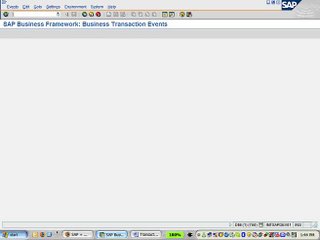
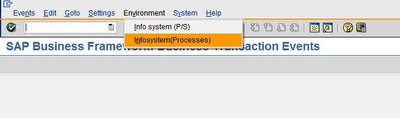
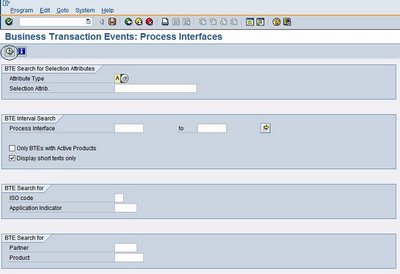
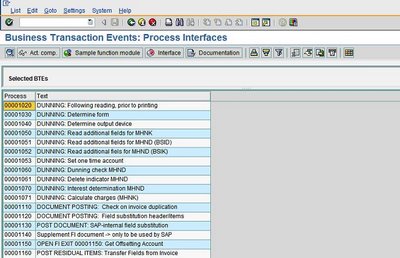
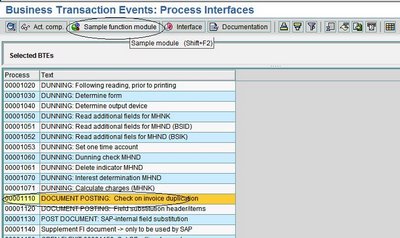


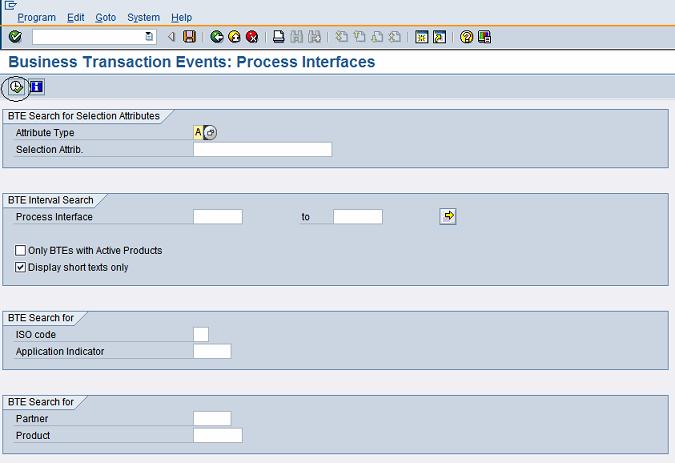
Next we have to find the process interface for duplicate invoice check! To do that, follow the following steps.
- Select the menu as stated below

- Execute the info system as stated below
- All the processes will be shown below
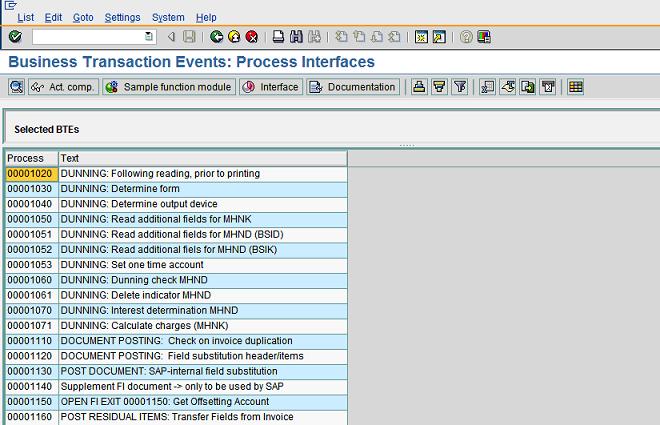
- Select the process 1110 and click on “Sample function module” as stated below

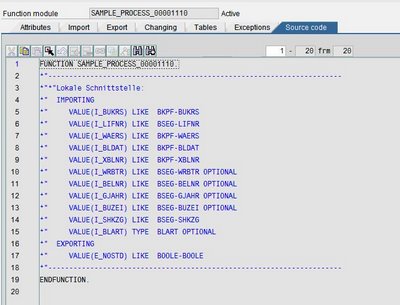
- Copy the sample functional module “SAMPLE_PROCESS_00001110” and create “ZSAMPLE_PROCESS_00001110”. Put the customized logic in the functional module “ZSAMPLE_PROCESS_00001110” and activate it!

- Now go back to FIBF and execute the menu as shown below

-
Define a new product and activate it

-
Now go back to FIBF and execute the menu as shown below

- Assign the function module “ZSAMPLE_PROCESS_00001110” to the process “1110”and the product that was defined in the earlier step.

-
Bingo!!!!!! Now every time when a vendor invoice is being posted the invoice check will be carried out using the custom logic built into the function module “ZSAMPLE_PROCESS_00001110”. But make sure that the “double invoice check” tick has been put on the relevant vendor masters!
21 Eylül 2008 Pazar
Display message
DATA: mesTAB TYPE TABLE OF BDCMSGCOLL with header line.
DATA: W_TEXTOUT LIKE T100-TEXT.
LOOP AT MESTAB WHERE MSGTYP = 'S' or MSGTYP = 'E'.
CALL FUNCTION 'MESSAGE_TEXT_BUILD'
EXPORTING
MSGID = mestab-msgid
MSGNR = mestab-msgnr
MSGV1 = mestab-msgv1
MSGV2 = mestab-msgv2
MSGV3 = mestab-msgv3
MSGV4 = mestab-msgv4
IMPORTING
MESSAGE_TEXT_OUTPUT = W_TEXTOUT.
CALL FUNCTION 'POPUP_TO_DISPLAY_TEXT'
EXPORTING
* TITEL = ' '
TEXTLINE1 = W_TEXTOUT
* TEXTLINE2 = ' '
* START_COLUMN = 25
* START_ROW = 6
.
ENDLOOP.
3 Eylül 2008 Çarşamba
Run an Executable Program with Parameters
If you wish to run an executable program from SAP it can be done by using the following Function Module.
We will see a simple example of opening a Notepad file from SAP and another example by opening a website through a browser.
Example 1
Example 2
GUI_RUN
These function modules are useful when you want to create an interface with SAP. Many a times it may be required to call an executable program from SAP and pass some Parameters to it. The called user program can then process the data and return back parameters to SAP. Function modules similar to GUI_RUN can be used to build such interfaces.We will see a simple example of opening a Notepad file from SAP and another example by opening a website through a browser.
Example 1
REPORT ZEX_GUIRUN .
CALL FUNCTION 'GUI_RUN'
EXPORTING
COMMAND = 'NOTEPAD.EXE'
PARAMETER = 'c:\TEST.TXT'
* CD = '
* IMPORTING
* RETURNCODE = .
CALL FUNCTION 'GUI_RUN'
EXPORTING
COMMAND = 'NOTEPAD.EXE'
PARAMETER = 'c:\TEST.TXT'
* CD = '
* IMPORTING
* RETURNCODE = .
Example 2
REPORT ZEX_GUIRUN .
CALL FUNCTION 'GUI_RUN'
EXPORTING
COMMAND = 'FIREFOX.EXE'
PARAMETER = 'GOOGLE.COM'
* CD = '
* IMPORTING
* RETURNCODE = .
CALL FUNCTION 'GUI_RUN'
EXPORTING
COMMAND = 'FIREFOX.EXE'
PARAMETER = 'GOOGLE.COM'
* CD = '
* IMPORTING
* RETURNCODE = .
comparing 2 programs with Split Screen Editor

In ABAP you may want to compare 2 programs. If you wish to compare the inactive version of the same program or of you want to compare 2 completely different programs. This can be done using the Split Screen Editor. Please follow the path shown below to open the Split Screen Editor.
Open the ABAP Editor Transaction SE38. Open any of the programs.
Click on Utilities >>>>>>>>>> More Utilities >>>>>>>>>>> Split Screen Editor.
In the following figure you will see the Split Screen Editor.
Popup screen
If you wish to POPUP a screen in SAP ABAP then it can be done as shown below. Do experiment with the X,Y co-ordinates for the POP-UP Screen. The following program pulls out sales orders from the sap database and displays them on the screen. When the user clicks on a particular sales order, it displays the Sales order number and the Customer number in the POP-UP Screen
REPORT ZEX_POPUPSCREEN .
*&---------------------------------------------------------------------*
*& ABAPLOVERS POPUP SCREEN
*&---------------------------------------------------------------------*
* Table Declaration
TABLES VBAK.
* Start of Selection
START-OF-SELECTION.
SELECT * FROM VBAK.
WRITE / VBAK-VBELN HOTSPOT ON.
ENDSELECT.
* Display the screen
AT LINE-SELECTION.
WINDOW STARTING AT 10 10
ENDING AT 40 25.
WRITE:/ 'VBAK-VBELN, VBAK-KUNNR'
REPORT ZEX_POPUPSCREEN .
*&---------------------------------------------------------------------*
*& ABAPLOVERS POPUP SCREEN
*&---------------------------------------------------------------------*
* Table Declaration
TABLES VBAK.
* Start of Selection
START-OF-SELECTION.
SELECT * FROM VBAK.
WRITE / VBAK-VBELN HOTSPOT ON.
ENDSELECT.
* Display the screen
AT LINE-SELECTION.
WINDOW STARTING AT 10 10
ENDING AT 40 25.
WRITE:/ 'VBAK-VBELN, VBAK-KUNNR'
Finding Path to SAP Transaction in Menu
You may be knowing the SAP transaction, and would like to trace the path to this transaction in the SAP menu. To do this SAP has provided a way. There is a transaction called SEARCH_SAP_MENU.
With the help of this transaction you can easily search the path to a particular transaction. For example if you wish to search the path to the transaction XD01 (Create Customer Centrally) then you can execute the transaction SEARCH_SAP_MENU and hit enter. You will see the following. You can then choose the one that has the shortest path.
With the help of this transaction you can easily search the path to a particular transaction. For example if you wish to search the path to the transaction XD01 (Create Customer Centrally) then you can execute the transaction SEARCH_SAP_MENU and hit enter. You will see the following. You can then choose the one that has the shortest path.
2 Eylül 2008 Salı
Copy to Windows ClipBoard
If you wish to copy the contents of the internal table to the Windows clipboard, you can do so by using the following function module.
SAP ABAP Function Module Copy to Clipboard
Find the code below.
SAP ABAP Function Module Copy to Clipboard
CLPB_EXPORT
If you use this function module, then the contents of the internal table can be copied to the Clipboard of the Presentation Server. Once the contents are copied to the clipboard they can be pasted into any windows application.Find the code below.
REPORT ZEX_CLIPBOARDEXP .
types: ty_tab(200) type c.
Data: wa_tab type ty_tab,
int_tab type table of ty_tab.
Move: 'This is line 1 again' to wa_tab.
append wa_tab to int_tab.
clear wa_tab.
Move: 'This is line 2 again' to wa_tab.
append wa_tab to int_tab.
clear wa_tab.
CALL FUNCTION 'CLPB_EXPORT'
TABLES
DATA_TAB = int_tab
EXCEPTIONS
CLPB_ERROR = 1
OTHERS = 2.
IF SY-SUBRC <> 0.
* MESSAGE ID SY-MSGID TYPE SY-MSGTY NUMBER SY-MSGNO
* WITH SY-MSGV1 SY-MSGV2 SY-MSGV3 SY-MSGV4.
ENDIF.
types: ty_tab(200) type c.
Data: wa_tab type ty_tab,
int_tab type table of ty_tab.
Move: 'This is line 1 again' to wa_tab.
append wa_tab to int_tab.
clear wa_tab.
Move: 'This is line 2 again' to wa_tab.
append wa_tab to int_tab.
clear wa_tab.
CALL FUNCTION 'CLPB_EXPORT'
TABLES
DATA_TAB = int_tab
EXCEPTIONS
CLPB_ERROR = 1
OTHERS = 2.
IF SY-SUBRC <> 0.
* MESSAGE ID SY-MSGID TYPE SY-MSGTY NUMBER SY-MSGNO
* WITH SY-MSGV1 SY-MSGV2 SY-MSGV3 SY-MSGV4.
ENDIF.
31 Ağustos 2008 Pazar
Info structure & evaluation structure
evaluation structure
mcs7 -- mcs8 -- mcs9
Info Structure
Standard number range of SAP is upto 499 and we can create customized Info Structures from 501 to 999.
mc21 -- mc22 -- mc23
The information structures are files of special statistics data that constitute an important element of the information systems. They form data basis for the standard analyses. Even planning is based on the information structures.
Standard Information Structures
Self-Defined Information Structures
Self-defined information structures enable you to add your own enhancements to the information systems. You can combine information structures to suit your own needs as well as define your own rules for updating. You can make use of the entire functional range in LIS to create your own information structures. You can use the standard analyses and the flexible analyses to evaluate the user-defined information structures and you can also create planning data for them.
The functions for the user-defined information structures are found in Customizing under the Logistics Information System. The complete functionality can be found under the menu option Data Basis.
You can find further information in the Implementation Guide.
To call up the Implementation Guide, proceed as follows:
From the R/3 system menu, select Tools ® Hypertext ® Structure ® IMG
A complete list of all of the available Implementation Guides will appear.
Place the cursor on Logistics General and select Edit ® Explode/hide.
A list of all of the documents that are assigned to Logistics General will appear.
Place the cursor on Logistics Information System and select Edit ® Explode/hide.
A list of all of the documents that are assigned to the Logistics Information System will appear.
You will find the Implementation Guide you require under Logistics Data Warehouse ® Data Basis.
Updating Statistical Data
The updating of statistical data can take place as an U1-update (update with delayed start) or a U2 update (statistical update).
With Release 4.6C you can also use V3 updating (user-defined period of time).
For every standard information structure, you can define the type of updating and the frequency with which the statistical data should be cumulated (on a daily, weekly, or monthly basis, or at posting period intervals). You do this using the Logistics Information System Configuration menu (see also Updating ).
You can improve the monitoring of the update process with the help of a user-specific list known as the update log. This shows details of the last event to be affected by statistics updating (see also Update Control ).
mcs7 -- mcs8 -- mcs9
Info Structure
Standard number range of SAP is upto 499 and we can create customized Info Structures from 501 to 999.
mc21 -- mc22 -- mc23
The information structures are files of special statistics data that constitute an important element of the information systems. They form data basis for the standard analyses. Even planning is based on the information structures.
Standard Information Structures
Self-Defined Information Structures
Self-defined information structures enable you to add your own enhancements to the information systems. You can combine information structures to suit your own needs as well as define your own rules for updating. You can make use of the entire functional range in LIS to create your own information structures. You can use the standard analyses and the flexible analyses to evaluate the user-defined information structures and you can also create planning data for them.
The functions for the user-defined information structures are found in Customizing under the Logistics Information System. The complete functionality can be found under the menu option Data Basis.
You can find further information in the Implementation Guide.
To call up the Implementation Guide, proceed as follows:
From the R/3 system menu, select Tools ® Hypertext ® Structure ® IMG
A complete list of all of the available Implementation Guides will appear.
Place the cursor on Logistics General and select Edit ® Explode/hide.
A list of all of the documents that are assigned to Logistics General will appear.
Place the cursor on Logistics Information System and select Edit ® Explode/hide.
A list of all of the documents that are assigned to the Logistics Information System will appear.
You will find the Implementation Guide you require under Logistics Data Warehouse ® Data Basis.
Updating Statistical Data
The updating of statistical data can take place as an U1-update (update with delayed start) or a U2 update (statistical update).
With Release 4.6C you can also use V3 updating (user-defined period of time).
For every standard information structure, you can define the type of updating and the frequency with which the statistical data should be cumulated (on a daily, weekly, or monthly basis, or at posting period intervals). You do this using the Logistics Information System Configuration menu (see also Updating ).
You can improve the monitoring of the update process with the help of a user-specific list known as the update log. This shows details of the last event to be affected by statistics updating (see also Update Control ).
Reporting Tools in SAP
SAP Query,
InfoSet Query (Ad Hoc Query)
QuickViewer
You can create InfoSets from various data sources , including logical databases, tables, table joins, and so on. The best business practice is to use the SAP delivered logical databases as your data source, because they were created for this purpose and there is at least one logical database delivered with your system for each module within SAP, including Accounting, Personnel Management, and so on. The F1S database used in this example is the training database that SAP uses in its training classes based on a fictional airline scheduling system. It is best to use this database for your test cases.
In contrast to using SAP Query and InfoSet (Ad Hoc) Query, you do not need to configure User Groups and InfoSets to use QuickViewer. However, if they have already created, you can use them. Users simply select a data source (table, database view, table join, logical database, or InfoSet) when building their QuickView.
Both Report Painter and Report Writer can be used to report on the following tables and tables types:
-- Evaluation structures set up in the Logistics Information System (LIS). These structures normally begin with an "S" or "ZF." Several different tables and views within the R/3 System can be added as evaluation structures.
Note: You cannot add cluster tables, such as BSEG.
--CCSS is used for Cost Center Accounting (CO-CCA), Internal Orders (CO-OPA), Activity Based Costing (CO-ABC) and for cost element reports in Project Systems (PS).
--GLFUNCT is used for functional area reporting in cost-of-sales accounting.
--GLPCT and GLPCOP are used for Profit Center Accounting (CO-PCA/EC-PCA).
--FILC is used for Legal Consolidations (FI-LC).
--COFIT is used for the Controlling Reconciliation Ledger (CO-CEL).
--ZZ tables are created for the Special Purpose Ledger (FI-SL).
--FIMC is used for consolidations in the Enterprise Controlling module (EC-LC).
--GLT0 is used for Financial Accounting (General Ledger) reports by account, company, and business area (FI-GL).
--KKBC, KKBE, and KKBU are used for the Controlling Product Costing module (CO-Costing).
Report Writer
Set types:
Basic sets , Single Dimension sets,Predefined column , Multi-dimensional sets
Mali İşler-->Maliyet muhasebesi veKontrol -->MasrafYeriMuhasebesi--> BilgiSistemi --> Araçlar --> Report Painter
Report Painter
Library
Library determines the following in report painter report:
Table that can be used in the report
Charaterstics that can be used in the report
Key Figures that can be used in the report
Basic Key Figures that can be used in the report
In order that the Report Writer can report on a specific database table, it must be entered in the control table T804A. The database table must not exist as a physical table, but can also be defined as a logical table in the Report Writer (table T804E), and contain several physical tables.
Peki library için tablo nereden yaratcaz??
The Table is the standard structure based on which you will be creating your Library and report.
The Report Writer can only report on tables if the attributes of these tables that are relevant for reporting are defined in control tables.
You should be able to make a Data Dictionary table available to Report Painter / Writer if you can create an Evaluation structure for the table .
To create an Eval structure In Logistics :
Tcode MCS7 - Create evaluation Structure.
(Path: Logistics >Sales & Distribution >Sales Info System >Flexible Analysis >Evaluation
Structure >Create)
You could name the Eval Structure "ZF*****", (must begin with "ZF").
Then click ( if this is a table and not another Eval structure.)
Enter the DD table "******". And click the check mark.
Then click and mark all the characteristic fields you want to report on, (if
you right click
you can select), then .
Do the same for
Then generate the Eval structure or
After you created the Eval structure, you can create a library with this Eval structure (table) in it.
http://www.sapdb.info/wp-content/uploads/2008/08/report_painter.pdf
InfoSet Query (Ad Hoc Query)
QuickViewer
You can create InfoSets from various data sources , including logical databases, tables, table joins, and so on. The best business practice is to use the SAP delivered logical databases as your data source, because they were created for this purpose and there is at least one logical database delivered with your system for each module within SAP, including Accounting, Personnel Management, and so on. The F1S database used in this example is the training database that SAP uses in its training classes based on a fictional airline scheduling system. It is best to use this database for your test cases.
In contrast to using SAP Query and InfoSet (Ad Hoc) Query, you do not need to configure User Groups and InfoSets to use QuickViewer. However, if they have already created, you can use them. Users simply select a data source (table, database view, table join, logical database, or InfoSet) when building their QuickView.
Both Report Painter and Report Writer can be used to report on the following tables and tables types:
-- Evaluation structures set up in the Logistics Information System (LIS). These structures normally begin with an "S" or "ZF." Several different tables and views within the R/3 System can be added as evaluation structures.
Note: You cannot add cluster tables, such as BSEG.
--CCSS is used for Cost Center Accounting (CO-CCA), Internal Orders (CO-OPA), Activity Based Costing (CO-ABC) and for cost element reports in Project Systems (PS).
--GLFUNCT is used for functional area reporting in cost-of-sales accounting.
--GLPCT and GLPCOP are used for Profit Center Accounting (CO-PCA/EC-PCA).
--FILC is used for Legal Consolidations (FI-LC).
--COFIT is used for the Controlling Reconciliation Ledger (CO-CEL).
--ZZ tables are created for the Special Purpose Ledger (FI-SL).
--FIMC is used for consolidations in the Enterprise Controlling module (EC-LC).
--GLT0 is used for Financial Accounting (General Ledger) reports by account, company, and business area (FI-GL).
--KKBC, KKBE, and KKBU are used for the Controlling Product Costing module (CO-Costing).
Report Writer
Set types:
Basic sets , Single Dimension sets,Predefined column , Multi-dimensional sets
Mali İşler-->Maliyet muhasebesi veKontrol -->MasrafYeriMuhasebesi--> BilgiSistemi --> Araçlar --> Report Painter
Report Painter
Library
Library determines the following in report painter report:
Table that can be used in the report
Charaterstics that can be used in the report
Key Figures that can be used in the report
Basic Key Figures that can be used in the report
In order that the Report Writer can report on a specific database table, it must be entered in the control table T804A. The database table must not exist as a physical table, but can also be defined as a logical table in the Report Writer (table T804E), and contain several physical tables.
Peki library için tablo nereden yaratcaz??
The Table is the standard structure based on which you will be creating your Library and report.
The Report Writer can only report on tables if the attributes of these tables that are relevant for reporting are defined in control tables.
You should be able to make a Data Dictionary table available to Report Painter / Writer if you can create an Evaluation structure for the table .
To create an Eval structure In Logistics :
Tcode MCS7 - Create evaluation Structure.
(Path: Logistics >Sales & Distribution >Sales Info System >Flexible Analysis >Evaluation
Structure >Create)
You could name the Eval Structure "ZF*****", (must begin with "ZF").
Then click
Enter the DD table "******". And click the check mark.
Then click
you right click
you can select), then
Do the same for
Then generate the Eval structure
After you created the Eval structure, you can create a library with this Eval structure (table) in it.
http://www.sapdb.info/wp-content/uploads/2008/08/report_painter.pdf
30 Ağustos 2008 Cumartesi
Select-Options Gizleme islemi
Birinci yol, 1000 ekranında daha raporumuzun içinde ki seçim durumları ekrana gelmeden çalışan "AT SELECTION-SCREEN OUTPUT" sekmesinde yapılanıdır.
**************************************************
select-options: SO_BELNR for bkpf-belnr modif id g1.......
AT SELECTION-SCREEN OUTPUT.
LOOP AT SCREEN.
CASE screen-group1.
WHEN 'G1'.
screen-active = '0'.
MODIFY SCREEN.
ENDCASE.
ENDLOOP.
**************************************************
İkinci yol ise, No-Display kullanmaktır.
SO_BELNR for bkpf-belnr no-display.
**************************************************
select-options: SO_BELNR for bkpf-belnr modif id g1.......
AT SELECTION-SCREEN OUTPUT.
LOOP AT SCREEN.
CASE screen-group1.
WHEN 'G1'.
screen-active = '0'.
MODIFY SCREEN.
ENDCASE.
ENDLOOP.
**************************************************
İkinci yol ise, No-Display kullanmaktır.
SO_BELNR for bkpf-belnr no-display.
Secim Ekraninda DropDownList kullanimi
PROGRAM z_drop.
TYPE-POOLS: vrm.
DATA: name TYPE vrm_id,
list TYPE vrm_values,
value LIKE LINE OF list.
PARAMETERS: ps_parm(10) AS LISTBOX VISIBLE LENGTH 10.
AT SELECTION-SCREEN OUTPUT.
name = 'PS_PARM'.
value-key = '1'.
value-text = 'Line 1'.
APPEND value TO list.
value-key = '2'.
value-text = 'Line 2'.
APPEND value TO list.
*Key: Seçildikten sonra yakalayacağımız anahtar alan.
*Text: Seçim ekranında listbox içinde ki text değer.
CALL FUNCTION 'VRM_SET_VALUES'
EXPORTING
id = name
values = list.
Start-Of-Selection.
...
...
End-Of-Selection.
TYPE-POOLS: vrm.
DATA: name TYPE vrm_id,
list TYPE vrm_values,
value LIKE LINE OF list.
PARAMETERS: ps_parm(10) AS LISTBOX VISIBLE LENGTH 10.
AT SELECTION-SCREEN OUTPUT.
name = 'PS_PARM'.
value-key = '1'.
value-text = 'Line 1'.
APPEND value TO list.
value-key = '2'.
value-text = 'Line 2'.
APPEND value TO list.
*Key: Seçildikten sonra yakalayacağımız anahtar alan.
*Text: Seçim ekranında listbox içinde ki text değer.
CALL FUNCTION 'VRM_SET_VALUES'
EXPORTING
id = name
values = list.
Start-Of-Selection.
...
...
End-Of-Selection.
String islemleri
*ITAB da aradığımız string var mı ?
DATA TEXT(100) VALUE 'Texas California New Mexico Louisiana Oregon'.
SEARCH TEXT FOR 'California'.
IF SY-SUBRC NE 0.
WRITE 'Not found'.
ENDIF.
SEARCH TEXT FOR 'cAliforniA'.
IF SY-SUBRC NE 0.
WRITE 'Not found'.
ENDIF.
SEARCH TEXT FOR 'New M'.
IF SY-SUBRC NE 0.
WRITE 'Not found'.
ENDIF.
* Replacing & translating .
DATA: STRING(80),EXPRESSION(30).
STRING = 'Variable: &. The variable & is substituted later.'.
REPLACE '&' WITH 'X' INTO STRING.
WRITE / STRING.
TRANSLATE STRING USING '&X'.
WRITE / STRING.EXPRESSION = 'a ** 2 + b ** 2 = c ** 2'.
TRANSLATE EXPRESSION USING 'axbycz'.
WRITE / EXPRESSION.
REPLACE ',' WITH '' INTO lv_degisken.
REPLACE ALL OCCURRENCES OF ',' IN lv_degisken WITH ''.
*Boşlukları silerek shift işlemi
NAMES = 'Joanne___'.
SHIFT NAMES RIGHT DELETING TRAILING SPACE.
WRITE / NAMES.
DATA TEXT(100) VALUE 'Texas California New Mexico Louisiana Oregon'.
SEARCH TEXT FOR 'California'.
IF SY-SUBRC NE 0.
WRITE 'Not found'.
ENDIF.
SEARCH TEXT FOR 'cAliforniA'.
IF SY-SUBRC NE 0.
WRITE 'Not found'.
ENDIF.
SEARCH TEXT FOR 'New M'.
IF SY-SUBRC NE 0.
WRITE 'Not found'.
ENDIF.
* Replacing & translating .
DATA: STRING(80),EXPRESSION(30).
STRING = 'Variable: &. The variable & is substituted later.'.
REPLACE '&' WITH 'X' INTO STRING.
WRITE / STRING.
TRANSLATE STRING USING '&X'.
WRITE / STRING.EXPRESSION = 'a ** 2 + b ** 2 = c ** 2'.
TRANSLATE EXPRESSION USING 'axbycz'.
WRITE / EXPRESSION.
REPLACE ',' WITH '' INTO lv_degisken.
REPLACE ALL OCCURRENCES OF ',' IN lv_degisken WITH ''.
*Boşlukları silerek shift işlemi
NAMES = 'Joanne___'.
SHIFT NAMES RIGHT DELETING TRAILING SPACE.
WRITE / NAMES.
Progress Bar yapimi
"İşlemin ne kadarının tamamlandığını ve ne kadarının kaldığını gösterir
REPORT Z_Progress.
TYPES: BEGIN OF t_mara,
matnr LIKE mara-matnr,
END OF t_mara.
DATA: it_mara TYPE STANDARD TABLE OF t_mara INITIAL SIZE 0,
wa_mara TYPE t_mara.
DATA: mara_lines TYPE i,
gd_percent TYPE i.
START-OF-SELECTION.
SELECT matnr INTO TABLE it_mara FROM mara.
CHECK sy-subrc EQ 0.
mara_lines = sy-dbcnt.
clear: gd_percent.
LOOP AT it_mara INTO wa_mara.
PERFORM progress_bar USING 'Veriler alınıyor...'(001)
sy-tabix mara_lines.
ENDLOOP.
FORM progress_bar USING p_value p_tabix p_nlines.
DATA: w_text(40),
w_percentage TYPE p,
w_percent_char(3).
w_percentage = ( p_tabix / p_nlines ) * 100.
w_percent_char = w_percentage.
SHIFT w_percent_char LEFT DELETING LEADING ' '.
CONCATENATE p_value w_percent_char '% Tamamlandı'(002) INTO w_text.
*bu kontrolü büyük verilerde loop yaptığımızda tekrar
*tekrar görünmesini engellemek için yapıyoruz
if w_percentage gt gd_percent or p_tabix eq 1.
CALL FUNCTION 'SAPGUI_PROGRESS_INDICATOR'
EXPORTING percentage = w_percentage
text = w_text.
gd_percent = w_percentage.
endif.
endform.
" PROGRESS_BAR
WRITE: /20 'Bitti" OK'.
REPORT Z_Progress.
TYPES: BEGIN OF t_mara,
matnr LIKE mara-matnr,
END OF t_mara.
DATA: it_mara TYPE STANDARD TABLE OF t_mara INITIAL SIZE 0,
wa_mara TYPE t_mara.
DATA: mara_lines TYPE i,
gd_percent TYPE i.
START-OF-SELECTION.
SELECT matnr INTO TABLE it_mara FROM mara.
CHECK sy-subrc EQ 0.
mara_lines = sy-dbcnt.
clear: gd_percent.
LOOP AT it_mara INTO wa_mara.
PERFORM progress_bar USING 'Veriler alınıyor...'(001)
sy-tabix mara_lines.
ENDLOOP.
FORM progress_bar USING p_value p_tabix p_nlines.
DATA: w_text(40),
w_percentage TYPE p,
w_percent_char(3).
w_percentage = ( p_tabix / p_nlines ) * 100.
w_percent_char = w_percentage.
SHIFT w_percent_char LEFT DELETING LEADING ' '.
CONCATENATE p_value w_percent_char '% Tamamlandı'(002) INTO w_text.
*bu kontrolü büyük verilerde loop yaptığımızda tekrar
*tekrar görünmesini engellemek için yapıyoruz
if w_percentage gt gd_percent or p_tabix eq 1.
CALL FUNCTION 'SAPGUI_PROGRESS_INDICATOR'
EXPORTING percentage = w_percentage
text = w_text.
gd_percent = w_percentage.
endif.
endform.
" PROGRESS_BAR
WRITE: /20 'Bitti" OK'.
Dialog Ekranini Popup Olarak Cagirma
Normalde , bir dialog ekranını çağırırken basitçe call screen metodunu kullanırırız,
çağırdığımız ekran tüm ekranı kapladığı için, zaman zaman bunun olmasını istemeyiz.
İstediğimiz boyutlarda popup ekranı gibi çağırmak için sonuna starting at komutunu ekleriz. Daha sonra vereceğimiz kordinatlara göre ekran gelecektir.
call screen '0300' starting at 20 11 ending at 70 24.
çağırdığımız ekran tüm ekranı kapladığı için, zaman zaman bunun olmasını istemeyiz.
İstediğimiz boyutlarda popup ekranı gibi çağırmak için sonuna starting at komutunu ekleriz. Daha sonra vereceğimiz kordinatlara göre ekran gelecektir.
call screen '0300' starting at 20 11 ending at 70 24.
Malzeme Olcu Donusumu
Malzemelerle uğraşırken zaman zaman ölçü dönüşümü yapmamız gerekebilir.
Örneğin 1 KG kaç M2 ya da5 Koli kaç Adet yapar gibi.
Bu çevirimleri yapmak için, MARC tablosuna gidip
dönüşümlerle uğraşmak yerine;
MD_CONVERT_MATERIAL_UNIT
Fonksiyonunu kullanabiliriz.
Örnek;
DATA:pmatnr LIKE mara-matnr,
pmein1 LIKE mara-meins,
pmein2 LIKE mara-meins,
pmeng1 LIKE ekpo-menge,
pmeng2 LIKE ekpo-menge.
CLEAR : pmatnr, pmein1,
pmein2, pmeng1, pmeng2.
CALL FUNCTION 'MD_CONVERT_MATERIAL_UNIT'
EXPORTING
i_matnr = pmatnr "malzeme numaramız
i_in_me = pmein1 "dönüşecek ölçü birimi
i_out_me = pmein2 "hangi ölçüye dönüşecek ?
i_menge = pmeng1 "miktar
IMPORTING
e_menge = pmeng2 "dönen miktar
EXCEPTION
Serror_in_application = 1
error = 2
OTHERS = 3.
Örneğin 1 KG kaç M2 ya da5 Koli kaç Adet yapar gibi.
Bu çevirimleri yapmak için, MARC tablosuna gidip
dönüşümlerle uğraşmak yerine;
MD_CONVERT_MATERIAL_UNIT
Fonksiyonunu kullanabiliriz.
Örnek;
DATA:pmatnr LIKE mara-matnr,
pmein1 LIKE mara-meins,
pmein2 LIKE mara-meins,
pmeng1 LIKE ekpo-menge,
pmeng2 LIKE ekpo-menge.
CLEAR : pmatnr, pmein1,
pmein2, pmeng1, pmeng2.
CALL FUNCTION 'MD_CONVERT_MATERIAL_UNIT'
EXPORTING
i_matnr = pmatnr "malzeme numaramız
i_in_me = pmein1 "dönüşecek ölçü birimi
i_out_me = pmein2 "hangi ölçüye dönüşecek ?
i_menge = pmeng1 "miktar
IMPORTING
e_menge = pmeng2 "dönen miktar
EXCEPTION
Serror_in_application = 1
error = 2
OTHERS = 3.
REUSE_ALV_FIELDCATALOG_MERGE
Bir ABAP programı içerisindeki Internal Table'dan ALV alan kataloğunu otomatik olarak oluşturabileceğinizi biliyor muydunuz? Aşağıda örnek bir kod görebilirsiniz:
CALL FUNCTION 'REUSE_ALV_FIELDCATALOG_MERGE'
EXPORTING
i_program_name = 'ZPYP_STOK_GENEL'
i_internal_tabname = 'PYP_ITAB'
i_inclname = 'ZPYP_STOK_GENEL'
CHANGING
ct_fieldcat = gt_fieldcat[].
CALL FUNCTION 'REUSE_ALV_FIELDCATALOG_MERGE'
EXPORTING
i_program_name = 'ZPYP_STOK_GENEL'
i_internal_tabname = 'PYP_ITAB'
i_inclname = 'ZPYP_STOK_GENEL'
CHANGING
ct_fieldcat = gt_fieldcat[].
ABAP'ta Sayıyı Yazıya Çevirmek
ABAP içerisinde "1500" şeklindeki bir sayıyı "Binbeşyüz" şeklinde yazdırmak için, SPELL_AMOUNT adlı fonksiyonu kullanabilirsiniz.
SD Tablo Takibi
SAP SD modülü içerisinde, bildiğiniz bir fatura numarasından teslimat, sipariş ve sözleşmeye şu şekilde erişebilirsiniz:
Bu yöntem, geçiş çapta veri çekmek söz konusu olduğunda performans açısından çok iyi sonuç vermeyebilir.
Fatura 90002935, kalem 101 ise;
VBFA: VBELN = 90002935, POSNN = 101, VBTYP_N = M, VBTYP_V = J diye gidiyorum. VBELV = 80008713, POSNV = 10 geliyor. Bu, teslimattır.
VBFA: VBELN = 80008713, POSNN = 10, VBTYP_N = J, VBTYP_V = C diye gidiyorum. VBELV = 2344, POSNV = 101 geliyor. Bu, sipariştir.
VBFA: VBELN = 2344, POSNN = 101, VBTYP_N = C, VBTYP_V = G diye gidiyorum. VBELV = 8980000006, POSNV = 101 geliyor. Bu, sözleşmedir.
Bu yöntem, geçiş çapta veri çekmek söz konusu olduğunda performans açısından çok iyi sonuç vermeyebilir.
ABAP'ta Mesajı Metne Çevirmek
SE91'de bulunan bir mesajı parametreleriyle birlikte düz bir metine çevirmek isterseniz, MESSAGE_TEXT_BUILD fonksiyonunu kullanabilirsiniz.
SmartForm Sistem Parametreleri
Bir ABAP programı için SY neyse, SmartForm için SFSY odur. SFSY içerisinde sistemle ve mevcut yazdırma işi ile ilgili bir sürü veri bulunabilir.
Reading Table Fields In ABAP
f you need to read the fields of a dictionary object (table, structure, etc), you can use the function DDIF_FIELDINFO_GET.
How To Obtain Material Price in ABAP
If you want to read the prices of a material in ABAP, you may find the following sample code useful. Please note that KALN1 in GT_ALVITEM would be filled from MBEW.
*&---------------------------------------------------------------------*
*& Form read_function_prices
*&---------------------------------------------------------------------*
FORM read_function_prices.
DATA:
BEGIN OF lt_kalnr OCCURS 0,
werks LIKE mbew-werks,
matnr LIKE mbew-matnr,
kalnr LIKE mbew-kaln1,
END OF lt_kalnr,
lt_ckmlpp TYPE ckmlpp OCCURS 0 WITH HEADER LINE,
lt_ckmlcr TYPE ckmlcr OCCURS 0 WITH HEADER LINE,
lt_ckmlhd TYPE ckmlhd OCCURS 0 WITH HEADER LINE,
lv_bdatj TYPE ckmlpp-bdatj,
lv_poper TYPE ckmlpp-poper.
* Başlık tablosuna malzemelerimizi dolduralım
LOOP AT gt_alvitem.
CLEAR lt_ckmlhd.
lt_ckmlhd-kalnr = gt_alvitem-kaln1.
APPEND lt_ckmlhd.
ENDLOOP.
* Dönemler
lv_poper = p_poper.
lv_bdatj = p_gjahr.
* Fonksiyonu çağıralım
CALL FUNCTION 'CKMS_PERIOD_READ_ONLY'
EXPORTING
i_period_from = lv_poper
i_year_from = lv_bdatj
i_period_to = lv_poper
i_year_to = lv_bdatj
TABLES
et_ckmlpp = lt_ckmlpp[]
et_ckmlcr = lt_ckmlcr[]
it_ckmlhd = lt_ckmlhd[].
* Okuduğumuz fiyatları geri döndürelim
LOOP AT lt_ckmlcr WHERE curtp EQ gc_curtp.
READ TABLE lt_ckmlpp WITH KEY kalnr = lt_ckmlcr-kalnr
bdatj = lt_ckmlcr-bdatj
poper = lt_ckmlcr-poper
untper = lt_ckmlcr-untper.
CHECK sy-subrc EQ 0.
READ TABLE gt_alvitem WITH KEY kaln1 = lt_ckmlcr-kalnr.
CHECK sy-subrc EQ 0.
gt_alvitem-salk3 = lt_ckmlcr-salk3.
gt_alvitem-lbkum = lt_ckmlpp-lbkum.
MODIFY gt_alvitem INDEX sy-tabix.
ENDLOOP.
ENDFORM. " read_function_prices
*&---------------------------------------------------------------------*
*& Form read_function_prices
*&---------------------------------------------------------------------*
FORM read_function_prices.
DATA:
BEGIN OF lt_kalnr OCCURS 0,
werks LIKE mbew-werks,
matnr LIKE mbew-matnr,
kalnr LIKE mbew-kaln1,
END OF lt_kalnr,
lt_ckmlpp TYPE ckmlpp OCCURS 0 WITH HEADER LINE,
lt_ckmlcr TYPE ckmlcr OCCURS 0 WITH HEADER LINE,
lt_ckmlhd TYPE ckmlhd OCCURS 0 WITH HEADER LINE,
lv_bdatj TYPE ckmlpp-bdatj,
lv_poper TYPE ckmlpp-poper.
* Başlık tablosuna malzemelerimizi dolduralım
LOOP AT gt_alvitem.
CLEAR lt_ckmlhd.
lt_ckmlhd-kalnr = gt_alvitem-kaln1.
APPEND lt_ckmlhd.
ENDLOOP.
* Dönemler
lv_poper = p_poper.
lv_bdatj = p_gjahr.
* Fonksiyonu çağıralım
CALL FUNCTION 'CKMS_PERIOD_READ_ONLY'
EXPORTING
i_period_from = lv_poper
i_year_from = lv_bdatj
i_period_to = lv_poper
i_year_to = lv_bdatj
TABLES
et_ckmlpp = lt_ckmlpp[]
et_ckmlcr = lt_ckmlcr[]
it_ckmlhd = lt_ckmlhd[].
* Okuduğumuz fiyatları geri döndürelim
LOOP AT lt_ckmlcr WHERE curtp EQ gc_curtp.
READ TABLE lt_ckmlpp WITH KEY kalnr = lt_ckmlcr-kalnr
bdatj = lt_ckmlcr-bdatj
poper = lt_ckmlcr-poper
untper = lt_ckmlcr-untper.
CHECK sy-subrc EQ 0.
READ TABLE gt_alvitem WITH KEY kaln1 = lt_ckmlcr-kalnr.
CHECK sy-subrc EQ 0.
gt_alvitem-salk3 = lt_ckmlcr-salk3.
gt_alvitem-lbkum = lt_ckmlpp-lbkum.
MODIFY gt_alvitem INDEX sy-tabix.
ENDLOOP.
ENDFORM. " read_function_prices
Tips & Tricks #1
1) parameters: p_matnr like mara-matnr obligatory value check.
Selection screen de mara tablosunda olmayan bir urunun girilmesi durumunda programi bastan calismasini engellemek icin "value check" kullanilir.
2)Abap kodlarininda arama yapmak için ;
Sistemdeki ABAP programlarının kodları içerisinde arama yapmak için, RSRSCAN1 veya RPR_ABAP_SOURCE_SCAN programını kullanabilirsiniz.
Selection screen de mara tablosunda olmayan bir urunun girilmesi durumunda programi bastan calismasini engellemek icin "value check" kullanilir.
2)Abap kodlarininda arama yapmak için ;
Sistemdeki ABAP programlarının kodları içerisinde arama yapmak için, RSRSCAN1 veya RPR_ABAP_SOURCE_SCAN programını kullanabilirsiniz.
29 Ağustos 2008 Cuma
Forming fieldcat from begin of structure ZFB03
*&---------------------------------------------------------------------*
*& Report ZFI_DOCLIST
*&
*&---------------------------------------------------------------------*
*&
*&
*&---------------------------------------------------------------------*
"INCLUDE ZFIDOCLISTTOP . " global Data
REPORT ZFI_DOCLIST.
* INCLUDE ZFIDOCLISTO01 . " PBO-Modules
* INCLUDE ZFIDOCLISTI01 . " PAI-Modules
* INCLUDE ZFIDOCLISTF01 . " FORM-Routines
TABLES: BKPF , BSEG .
DATA: BEGIN OF gen_struct,
BUKRS LIKE BKPF-BUKRS,
GSBER LIKE BSEG-GSBER,
BELNR LIKE BKPF-BELNR,
GJAHR LIKE BKPF-GJAHR,
BLART LIKE BKPF-BLART,
BLDAT LIKE BKPF-BLDAT,
BUDAT LIKE BKPF-BUDAT,
XBLNR LIKE BKPF-XBLNR,
CPUDT LIKE BKPF-CPUDT,
USNAM LIKE BKPF-USNAM,
END OF gen_struct.
DATA: BEGIN OF doc_struct,
BUKRS LIKE BKPF-BUKRS,
GSBER LIKE BSEG-GSBER,
BELNR LIKE BKPF-BELNR,
GJAHR LIKE BKPF-GJAHR,
BLART LIKE BKPF-BLART,
BLDAT LIKE BKPF-BLDAT,
BUDAT LIKE BKPF-BUDAT,
XBLNR LIKE BKPF-XBLNR,
CPUDT LIKE BKPF-CPUDT,
USNAM LIKE BKPF-USNAM,
END OF doc_struct.
DATA: GEN_TABLE like TABLE OF gen_struct WITH HEADER LINE.
DATA: DOC_TABLE like TABLE OF doc_struct WITH HEADER LINE.
DATA: OK_CODE LIKE SY-UCOMM,
G_CONTAINER TYPE SCRFNAME VALUE 'BCALV_GRID_0100_CONT1',
GRID1 TYPE REF TO CL_GUI_ALV_GRID,
G_CUSTOM_CONTAINER TYPE REF TO CL_GUI_CUSTOM_CONTAINER.
DATA: GT_FIELDCAT TYPE lvc_t_fcat.
DATA: KT_FIELDCAT TYPE KKBLO_T_FIELDCAT.
DATA: WA_KT_FIELDCAT type line of KKBLO_T_FIELDCAT.
CLASS lcl_event_handler DEFINITION .
PUBLIC SECTION .
METHODS:
*hotspot click control
handle_hotspot_click
FOR EVENT hotspot_click OF cl_gui_alv_grid
IMPORTING e_row_id e_column_id es_row_no.
PRIVATE SECTION.
ENDCLASS. "lcl_event_handler DEFINITION
CLASS lcl_event_handler IMPLEMENTATION .
*Handle Hotspot Click
METHOD handle_hotspot_click .
PERFORM handle_hotspot_click USING
e_row_id e_column_id es_row_no.
ENDMETHOD . "handle_hotspot_click
ENDCLASS .
DATA: gr_event_handler TYPE REF TO lcl_event_handler.
SELECTION-SCREEN BEGIN OF block ksa.
SELECT-OPTIONS: s_bukrs FOR bkpf-bukrs OBLIGATORY ,
s_belnr FOR bkpf-belnr ,
s_gsber FOR bseg-gsber ,
s_gjahr FOR bkpf-gjahr default sy-datum+0(4)
OBLIGATORY ,
s_blart FOR bkpf-blart ,
s_bldat FOR bkpf-bldat ,
s_cpudt FOR bkpf-cpudt ,
s_usnam FOR bkpf-usnam
default sy-uname,
s_budat FOR bkpf-budat ,
s_xblnr FOR bkpf-xblnr .
SELECTION-SCREEN END OF block ksa.
INITIALIZATION.
DATA new_date LIKE sy-datum.
CALL FUNCTION 'RE_ADD_MONTH_TO_DATE'
EXPORTING
months = '-1'
olddate = sy-datum
IMPORTING
newdate = new_date.
s_bldat-sign = 'I'.
s_bldat-option = 'BT'.
s_bldat-low = new_date.
s_bldat-high = sy-datum.
append s_bldat.
start-of-selection.
SELECT * INTO CORRESPONDING FIELDS OF TABLE doc_Table
FROM BKPF
WHERE bukrs in s_bukrs AND
belnr in s_belnr AND
gjahr in s_gjahr AND
blart in s_blart AND
bldat in s_bldat AND
budat in s_budat AND
xblnr in s_xblnr AND
cpudt in s_cpudt AND
usnam in s_usnam .
LOOP AT doc_Table.
SELECT SINGLE * INTO CORRESPONDING FIELDS OF gen_Table from BSEG
where bukrs = doc_Table-bukrs and
belnr = doc_Table-belnr and
gjahr = doc_Table-gjahr and
gsber in s_gsber .
if sy-subrc = 0.
gen_Table-blart = doc_Table-blart.
gen_Table-bldat = doc_Table-bldat.
gen_Table-budat = doc_Table-budat.
gen_Table-xblnr = doc_Table-xblnr.
gen_Table-CPUDT = doc_Table-CPUDT.
gen_Table-USNAM = doc_Table-USNAM.
APPEND gen_Table.
endif.
ENDLOOP.
CALL SCREEN 100.
PERFORM READ_DATA.
FORM READ_DATA.
ENDFORM.
FORM INIT_FIELDCAT .
call function 'K_KKB_FIELDCAT_MERGE'
exporting
i_callback_program = sy-repid
i_tabname = 'GEN_STRUCT'
i_inclname = sy-repid
I_BYPASSING_BUFFER = 'X'
changing
ct_fieldcat = kt_fieldcat[]
exceptions
inconsistent_interface = 1
others = 2.
loop at kt_fieldcat into wa_kt_fieldcat.
IF WA_KT_FIELDCAT-FIELDNAME = 'BELNR'.
wa_kt_fieldcat-hotspot = 'X'.
modify kt_fieldcat from wa_kt_fieldcat.
ENDIF.
endloop.
call function 'LVC_TRANSFER_FROM_KKBLO'
exporting
it_fieldcat_kkblo = Kt_fieldcat[]
importing
et_fieldcat_lvc = gt_fieldcat[].
CALL FUNCTION 'LVC_FIELDCATALOG_MERGE'
EXPORTING
I_INTERNAL_TABNAME = 'GEN_TABLE'
CHANGING
ct_fieldcat = gt_fieldcat[]
EXCEPTIONS
inconsistent_interface = 1
program_error = 2
OTHERS = 3.
ENDFORM.
FORM DISPLAY_ALV.
IF G_CUSTOM_CONTAINER IS INITIAL.
CREATE OBJECT G_CUSTOM_CONTAINER
EXPORTING CONTAINER_NAME = G_CONTAINER.
CREATE OBJECT GRID1
EXPORTING I_PARENT = G_CUSTOM_CONTAINER.
CREATE OBJECT gr_event_handler .
CALL METHOD GRID1->SET_TABLE_FOR_FIRST_DISPLAY
"EXPORTING
CHANGING
it_fieldcatalog = gt_fieldcat[]
it_outtab = gen_table[].
SET HANDLER gr_event_handler->handle_hotspot_click FOR grid1.
ENDIF.
ENDFORM.
*&---------------------------------------------------------------------*
*& Module STATUS_0100 OUTPUT
*&---------------------------------------------------------------------*
* text
*----------------------------------------------------------------------*
MODULE STATUS_0100 OUTPUT.
SET PF-STATUS 'STATUS_100'.
"SET TITLEBAR 'Belge Listesi'.
PERFORM INIT_FIELDCAT.
PERFORM DISPLAY_ALV.
ENDMODULE. " STATUS_0100 OUTPUT
"INCLUDE ZFI_DOCLIST_STATUS_0100O01.
INCLUDE ZFI_DOCLIST_USER_COMMAND_01I01.
FORM handle_hotspot_click USING i_row_id TYPE lvc_s_row
i_column_id TYPE lvc_s_col
is_row_no TYPE lvc_s_roid.
READ TABLE gen_table INDEX is_row_no-row_id .
SET PARAMETER ID 'BUK' FIELD gen_table-bukrs.
SET PARAMETER ID 'BLN' FIELD gen_table-belnr.
SET PARAMETER ID 'GJR' FIELD gen_table-gjahr.
CALL TRANSACTION 'FB03' AND SKIP FIRST SCREEN .
ENDFORM.
*& Report ZFI_DOCLIST
*&
*&---------------------------------------------------------------------*
*&
*&
*&---------------------------------------------------------------------*
"INCLUDE ZFIDOCLISTTOP . " global Data
REPORT ZFI_DOCLIST.
* INCLUDE ZFIDOCLISTO01 . " PBO-Modules
* INCLUDE ZFIDOCLISTI01 . " PAI-Modules
* INCLUDE ZFIDOCLISTF01 . " FORM-Routines
TABLES: BKPF , BSEG .
DATA: BEGIN OF gen_struct,
BUKRS LIKE BKPF-BUKRS,
GSBER LIKE BSEG-GSBER,
BELNR LIKE BKPF-BELNR,
GJAHR LIKE BKPF-GJAHR,
BLART LIKE BKPF-BLART,
BLDAT LIKE BKPF-BLDAT,
BUDAT LIKE BKPF-BUDAT,
XBLNR LIKE BKPF-XBLNR,
CPUDT LIKE BKPF-CPUDT,
USNAM LIKE BKPF-USNAM,
END OF gen_struct.
DATA: BEGIN OF doc_struct,
BUKRS LIKE BKPF-BUKRS,
GSBER LIKE BSEG-GSBER,
BELNR LIKE BKPF-BELNR,
GJAHR LIKE BKPF-GJAHR,
BLART LIKE BKPF-BLART,
BLDAT LIKE BKPF-BLDAT,
BUDAT LIKE BKPF-BUDAT,
XBLNR LIKE BKPF-XBLNR,
CPUDT LIKE BKPF-CPUDT,
USNAM LIKE BKPF-USNAM,
END OF doc_struct.
DATA: GEN_TABLE like TABLE OF gen_struct WITH HEADER LINE.
DATA: DOC_TABLE like TABLE OF doc_struct WITH HEADER LINE.
DATA: OK_CODE LIKE SY-UCOMM,
G_CONTAINER TYPE SCRFNAME VALUE 'BCALV_GRID_0100_CONT1',
GRID1 TYPE REF TO CL_GUI_ALV_GRID,
G_CUSTOM_CONTAINER TYPE REF TO CL_GUI_CUSTOM_CONTAINER.
DATA: GT_FIELDCAT TYPE lvc_t_fcat.
DATA: KT_FIELDCAT TYPE KKBLO_T_FIELDCAT.
DATA: WA_KT_FIELDCAT type line of KKBLO_T_FIELDCAT.
CLASS lcl_event_handler DEFINITION .
PUBLIC SECTION .
METHODS:
*hotspot click control
handle_hotspot_click
FOR EVENT hotspot_click OF cl_gui_alv_grid
IMPORTING e_row_id e_column_id es_row_no.
PRIVATE SECTION.
ENDCLASS. "lcl_event_handler DEFINITION
CLASS lcl_event_handler IMPLEMENTATION .
*Handle Hotspot Click
METHOD handle_hotspot_click .
PERFORM handle_hotspot_click USING
e_row_id e_column_id es_row_no.
ENDMETHOD . "handle_hotspot_click
ENDCLASS .
DATA: gr_event_handler TYPE REF TO lcl_event_handler.
SELECTION-SCREEN BEGIN OF block ksa.
SELECT-OPTIONS: s_bukrs FOR bkpf-bukrs OBLIGATORY ,
s_belnr FOR bkpf-belnr ,
s_gsber FOR bseg-gsber ,
s_gjahr FOR bkpf-gjahr default sy-datum+0(4)
OBLIGATORY ,
s_blart FOR bkpf-blart ,
s_bldat FOR bkpf-bldat ,
s_cpudt FOR bkpf-cpudt ,
s_usnam FOR bkpf-usnam
default sy-uname,
s_budat FOR bkpf-budat ,
s_xblnr FOR bkpf-xblnr .
SELECTION-SCREEN END OF block ksa.
INITIALIZATION.
DATA new_date LIKE sy-datum.
CALL FUNCTION 'RE_ADD_MONTH_TO_DATE'
EXPORTING
months = '-1'
olddate = sy-datum
IMPORTING
newdate = new_date.
s_bldat-sign = 'I'.
s_bldat-option = 'BT'.
s_bldat-low = new_date.
s_bldat-high = sy-datum.
append s_bldat.
start-of-selection.
SELECT * INTO CORRESPONDING FIELDS OF TABLE doc_Table
FROM BKPF
WHERE bukrs in s_bukrs AND
belnr in s_belnr AND
gjahr in s_gjahr AND
blart in s_blart AND
bldat in s_bldat AND
budat in s_budat AND
xblnr in s_xblnr AND
cpudt in s_cpudt AND
usnam in s_usnam .
LOOP AT doc_Table.
SELECT SINGLE * INTO CORRESPONDING FIELDS OF gen_Table from BSEG
where bukrs = doc_Table-bukrs and
belnr = doc_Table-belnr and
gjahr = doc_Table-gjahr and
gsber in s_gsber .
if sy-subrc = 0.
gen_Table-blart = doc_Table-blart.
gen_Table-bldat = doc_Table-bldat.
gen_Table-budat = doc_Table-budat.
gen_Table-xblnr = doc_Table-xblnr.
gen_Table-CPUDT = doc_Table-CPUDT.
gen_Table-USNAM = doc_Table-USNAM.
APPEND gen_Table.
endif.
ENDLOOP.
CALL SCREEN 100.
PERFORM READ_DATA.
FORM READ_DATA.
ENDFORM.
FORM INIT_FIELDCAT .
call function 'K_KKB_FIELDCAT_MERGE'
exporting
i_callback_program = sy-repid
i_tabname = 'GEN_STRUCT'
i_inclname = sy-repid
I_BYPASSING_BUFFER = 'X'
changing
ct_fieldcat = kt_fieldcat[]
exceptions
inconsistent_interface = 1
others = 2.
loop at kt_fieldcat into wa_kt_fieldcat.
IF WA_KT_FIELDCAT-FIELDNAME = 'BELNR'.
wa_kt_fieldcat-hotspot = 'X'.
modify kt_fieldcat from wa_kt_fieldcat.
ENDIF.
endloop.
call function 'LVC_TRANSFER_FROM_KKBLO'
exporting
it_fieldcat_kkblo = Kt_fieldcat[]
importing
et_fieldcat_lvc = gt_fieldcat[].
CALL FUNCTION 'LVC_FIELDCATALOG_MERGE'
EXPORTING
I_INTERNAL_TABNAME = 'GEN_TABLE'
CHANGING
ct_fieldcat = gt_fieldcat[]
EXCEPTIONS
inconsistent_interface = 1
program_error = 2
OTHERS = 3.
ENDFORM.
FORM DISPLAY_ALV.
IF G_CUSTOM_CONTAINER IS INITIAL.
CREATE OBJECT G_CUSTOM_CONTAINER
EXPORTING CONTAINER_NAME = G_CONTAINER.
CREATE OBJECT GRID1
EXPORTING I_PARENT = G_CUSTOM_CONTAINER.
CREATE OBJECT gr_event_handler .
CALL METHOD GRID1->SET_TABLE_FOR_FIRST_DISPLAY
"EXPORTING
CHANGING
it_fieldcatalog = gt_fieldcat[]
it_outtab = gen_table[].
SET HANDLER gr_event_handler->handle_hotspot_click FOR grid1.
ENDIF.
ENDFORM.
*&---------------------------------------------------------------------*
*& Module STATUS_0100 OUTPUT
*&---------------------------------------------------------------------*
* text
*----------------------------------------------------------------------*
MODULE STATUS_0100 OUTPUT.
SET PF-STATUS 'STATUS_100'.
"SET TITLEBAR 'Belge Listesi'.
PERFORM INIT_FIELDCAT.
PERFORM DISPLAY_ALV.
ENDMODULE. " STATUS_0100 OUTPUT
"INCLUDE ZFI_DOCLIST_STATUS_0100O01.
INCLUDE ZFI_DOCLIST_USER_COMMAND_01I01.
FORM handle_hotspot_click USING i_row_id TYPE lvc_s_row
i_column_id TYPE lvc_s_col
is_row_no TYPE lvc_s_roid.
READ TABLE gen_table INDEX is_row_no-row_id .
SET PARAMETER ID 'BUK' FIELD gen_table-bukrs.
SET PARAMETER ID 'BLN' FIELD gen_table-belnr.
SET PARAMETER ID 'GJR' FIELD gen_table-gjahr.
CALL TRANSACTION 'FB03' AND SKIP FIRST SCREEN .
ENDFORM.
Kaydol:
Yorumlar (Atom)
