1) FM : HTTP_POST
types c255(255) type c.
data : rlength type i,
rfcdest like rfcdes-rfcdest,
absuri(100) type c.
data : request_table type table of c255 with header line,
response_table type table of c255 with header line,
response_header_table type table of c255,
request_header type table of c255.
call function 'HTTP_POST'
exporting
absolute_uri = absuri
request_entity_body_length = rlength
rfc_destination = 'SAPHTTP'
importing
status_code = status_code
status_text = status_text
response_entity_body_length = response_body_length
tables
request_entity_body = request_table
response_entity_body = response_table
response_headers = response_header_table
request_headers = request_header
.
2)T.Code lpconfig ...sayfa webservice ise (yani asmx ise..)soap la mesaj gondermek icin
22 Ekim 2008 Çarşamba

19 Ekim 2008 Pazar
TAW10_1 Lesson 8 Basic Abap Elements
There are 3 categories of types in total
1)Standart 2)Local 3)Global
Standart types are divided int 2 groups
1)Complete 2)Incomplete types
Complete types (fixed)
a)D --> format YYYYMMDD length 8
b)T --> format HHMMSS length 6
c) I --> integer length 4
d) F --> length 8
e) STRING
F) XSTRING
Incomplete standart types
a)C
b)N
c)X
d)P the number of decimal points may also be specified
TYPES type_name TYPE ...
DATA myvar TYPE type_name.
DATA myvar2 LIKE myvar.
DEMO_MESSAGES demo program that is shipped in the SAP standart.
MOVE-CORRESPONDING , are available under the same name in both the source and target structure.
After executing the first WRITE statement, an additional button appears in the tool bar.You can use this new button to display the list buffer generated so far.
Caution: DATA itab TYPE TABLE OF table
In doing so, an internal table would be defined, the rows of which would also be internal tables.
APPEND this operation can only be used with standart tables.
INSERT LINES OF itab1INTO itab2 .
APPEND LINES OF itab1TO itab2.
sy-tabix contains the row number of the current table entry.
WITH TABLE KEY addition all key fields have to be supplied with data.If you want to limit the fields you must use the WITH KEY.
following very old syntax also defines an internal table with header line
DATA: BEGIN OF itab OCCURS n,
field1 TYPE...
field2 TYPE ...
END OF itab.
1)Standart 2)Local 3)Global
Standart types are divided int 2 groups
1)Complete 2)Incomplete types
Complete types (fixed)
a)D --> format YYYYMMDD length 8
b)T --> format HHMMSS length 6
c) I --> integer length 4
d) F --> length 8
e) STRING
F) XSTRING
Incomplete standart types
a)C
b)N
c)X
d)P the number of decimal points may also be specified
TYPES type_name TYPE ...
DATA myvar TYPE type_name.
DATA myvar2 LIKE myvar.
DEMO_MESSAGES demo program that is shipped in the SAP standart.
MOVE-CORRESPONDING , are available under the same name in both the source and target structure.
After executing the first WRITE statement, an additional button appears in the tool bar.You can use this new button to display the list buffer generated so far.
Caution: DATA itab TYPE TABLE OF table
In doing so, an internal table would be defined, the rows of which would also be internal tables.
APPEND this operation can only be used with standart tables.
INSERT LINES OF itab1
APPEND LINES OF itab1
sy-tabix contains the row number of the current table entry.
WITH TABLE KEY addition all key fields have to be supplied with data.If you want to limit the fields you must use the WITH KEY.
following very old syntax also defines an internal table with header line
DATA: BEGIN OF itab OCCURS n,
field1 TYPE...
field2 TYPE ...
END OF itab.
17 Ekim 2008 Cuma
SAP Webservice
Genel link : https://www.sdn.sap.com/irj/sdn/webservices
https://www.sdn.sap.com/irj/sdn/weblogs?blog=/pub/wlg/11504
Örn :
http://sapsrv.anadolu.corp/sap/bc/srt/rfc/sap/ZWEBINVOICE_GETDETAIL2?sap-
client=030&wsdl=1.1&mode=sap_wsdl&style=rpc
http://srvopt081.anadolu.corp/sap/bc/srt/rfc/sap/ZWEBINVOICE_GETDETAIL?sap-client=850&wsdl=1.1
T.code : SE80 --> Local Objects --> Enterprise Services -->Service Definition
WSADMIN
Goto --> Administrator Settings --> J2EE server http://srvopt081.anadolu.corp:50000
WSCONFIG
16 Ekim 2008 Perşembe
Icon List
REPORT ZICONS .
TABLES: ICON.
INCLUDE.
FIELD-SYMBOLS:.
SELECT * FROM ICON.
ASSIGN (ICON-NAME) TO.
WRITE: /(5), 20 '@',21 ICON-ID+1(2),23 '@',ICON-OLENG,
ICON-BUTTON,ICON-STATUS,ICON-MESSAGE,ICON-FUNCTION,
ICON-NAME.
ENDSELECT.
15 Ekim 2008 Çarşamba
Mail Gönderimi
SO_NEW_DOCUMENT_ATT_SEND_API1 'den sonra
Transaction code: SCON, SCOT, SOST
IF SY-SUBRC = 0.
   SUBMIT rsconn01 WITH mode = '*' AND RETURN.
ENDIF.
Transaction code: SCON, SCOT, SOST
14 Ekim 2008 Salı
Client Copy
If you want to copy a script form from developement server to quality server either you can release that transport request number or you can copy using the program RSTXSCRP.
To copy a script form from on client to other with in the same server the there are two ways .
1.transaction SCC1.
go to SCC1 ...there give your transport request number containing your script form and also give your source client number.
2.In your targent client system goto SE71---->utilities--->copy from client
give your source form name,source client,target form name.
To copy a script form from on client to other with in the same server the there are two ways .
1.transaction SCC1.
go to SCC1 ...there give your transport request number containing your script form and also give your source client number.
2.In your targent client system goto SE71---->utilities--->copy from client
give your source form name,source client,target form name.
7 Ekim 2008 Salı
Dönem açma / kapama MMPV
MMPV den sadece 2 aylik donem acik kaldigi icin , misal 8 i kapa ve 10 ac boylece 9 ve 10 acik olacak...


6 Ekim 2008 Pazartesi
SAP Business Transaction Events
I’m extremely sorry that I couldn’t write on my blog for some time because of the assignments that I had to finish for my clients! Today I got some free time and decided to talk about SAP business transaction events! 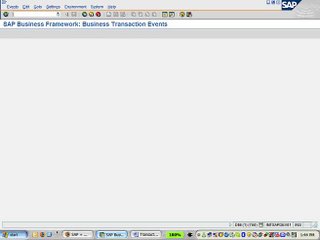
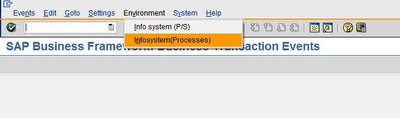
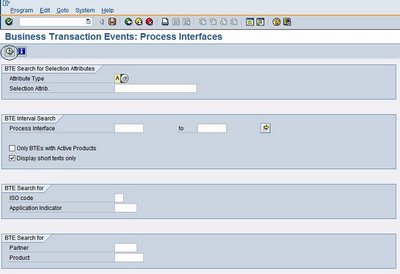
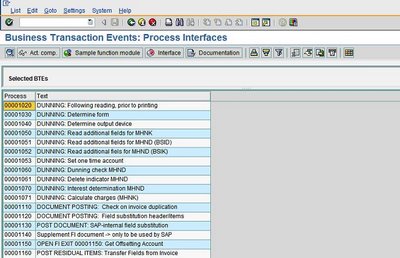
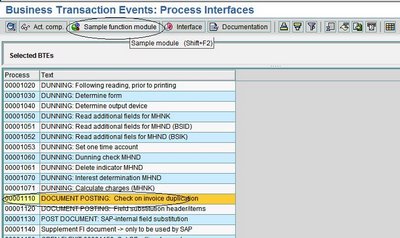


Next we have to find the process interface for duplicate invoice check! To do that, follow the following steps.
- Select the menu as stated below

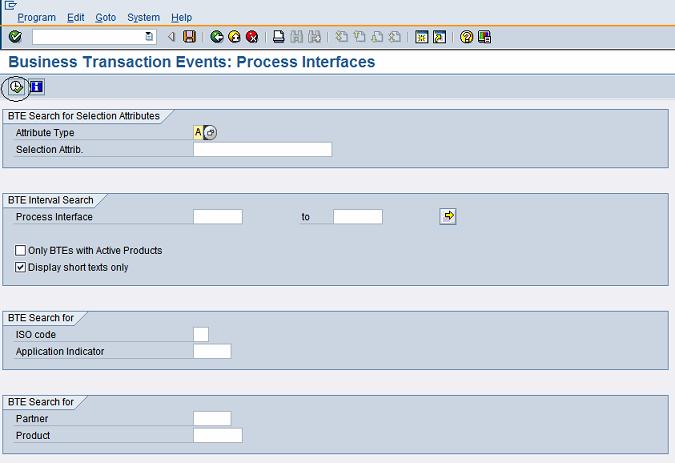
- Execute the info system as stated below
- All the processes will be shown below
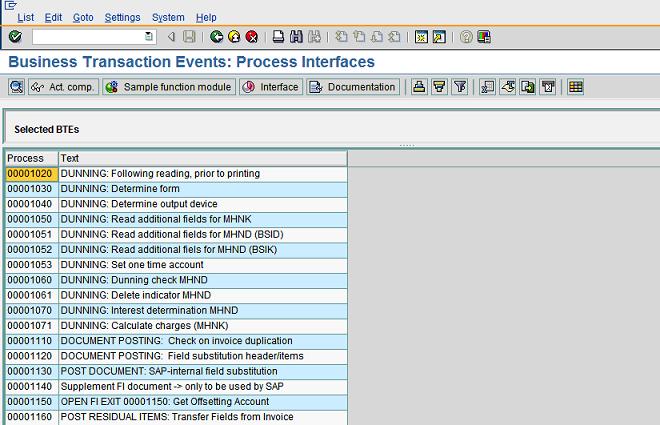
- Select the process 1110 and click on “Sample function module” as stated below

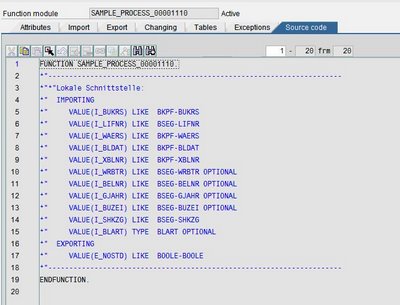
- Copy the sample functional module “SAMPLE_PROCESS_00001110” and create “ZSAMPLE_PROCESS_00001110”. Put the customized logic in the functional module “ZSAMPLE_PROCESS_00001110” and activate it!

- Now go back to FIBF and execute the menu as shown below

-
Define a new product and activate it

-
Now go back to FIBF and execute the menu as shown below

- Assign the function module “ZSAMPLE_PROCESS_00001110” to the process “1110”and the product that was defined in the earlier step.

-
Bingo!!!!!! Now every time when a vendor invoice is being posted the invoice check will be carried out using the custom logic built into the function module “ZSAMPLE_PROCESS_00001110”. But make sure that the “double invoice check” tick has been put on the relevant vendor masters!
Kaydol:
Yorumlar (Atom)
